













 Shopping guides
 Help
 Log in
Payments and invoicing
What payment methods are available?
At OfficeChair365 we offer a range of secure payment methods, tailored to your needs:
Bank card
We accept most credit and debit cards, including Mastercard, Visa and American Express (AMEX), among others.
Bank transfer
When you select this option, the details needed to make the transfer will be shown. You have 5 working days to complete the payment. It is essential to include your order number in the payment reference so that it can be correctly identified. If the transfer is not received within the set period, the order will be cancelled.
Important:
- Payments must only be made to the bank account shown on the official OfficeChair365 website and in your order confirmation email.
- OfficeChair365 never communicates changes to its bank details by any other means. Always check that the details match before making a payment.
- Any payment made to a different account will not be valid and will not release the customer from their payment obligation to OfficeChair365.
If you have any doubts or receive suspicious payment instructions, contact your usual contact at OfficeChair365 directly, preferably by phone, before making the transfer.
PayPal
With PayPal you can make secure online payments without directly sharing your financial details. More information here.
Online financing
Thanks to Klarna and PayPal you can split the cost of your purchases into instalments. Find out more here.
Is it safe to pay online?
At OfficeChair365 we take the security of your personal and payment data very seriously. All transactions are processed through secure connections and specialised online payment systems.
You can check that our website uses an encrypted connection by looking for the padlock icon next to the page address and because the URL starts with “https”.
Do prices include VAT?
We sell to businesses, professionals and private customers. On our website you can choose between two display options:
- Business: prominently displays prices excluding VAT. This view is intended exclusively for businesses and professionals.
- Personal: displays prices including VAT. Select this option if you are buying as a private customer.
Can I change my invoicing details?
If you need to change your invoicing details, you have several options depending on the status of your order:
Before placing your order
You can change your invoicing details directly from your customer account. Log in, go to the “Address book” section, select the billing address and click “Edit”. You can also create a new billing address if you prefer.
During the checkout process
In the last step of checkout, you can update your details in the “Billing and delivery address” section.
After placing your order
If your order has been confirmed but not yet shipped, contact us through the invoice form available in your account and we will help you update your details.
If the order has already been shipped, we recommend contacting us as soon as possible so we can assess the options available.
How do I get an invoice for my order?
The tax invoice will be available in your customer account around 48 hours after the order has been processed and dispatched from our warehouse. In the meantime, you can also download a proforma invoice for information purposes.
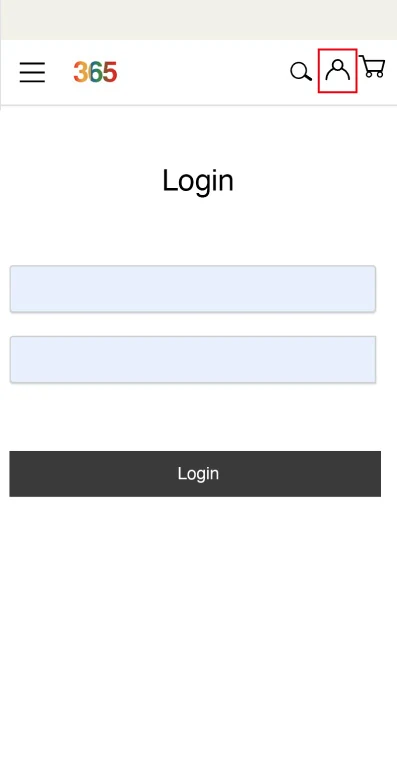
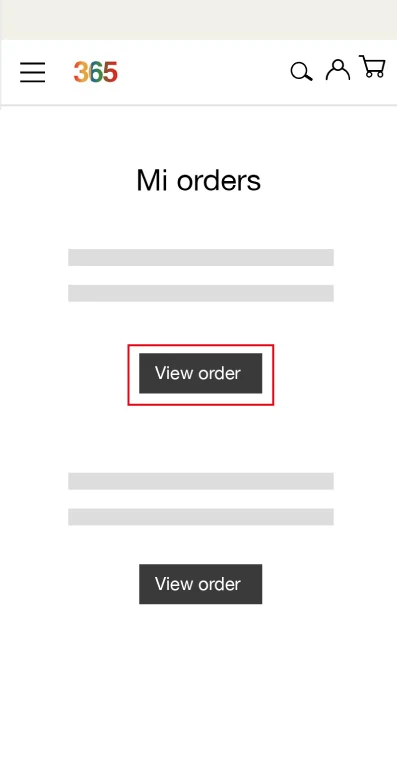
To download it, simply log in to your customer account, go to “My orders”, find the relevant order and click “Download invoice”.
If you made the purchase as a guest and do not have an account, you can create one using the same email address you used to place the order. This way you will also be able to access your invoices.
Please note that if you did not request an invoice during checkout, a simplified invoice will be issued by default. If you need a full invoice or want to change any details, you can request it through the invoice form available in your customer account, in the orders section.
Can I request a change to an invoice that has already been issued?
If you need to make any changes to an invoice that has already been issued, you can request them using the invoice form found in the “My orders” section.
To do so, log in to your customer account, go to the “My orders” section, find the relevant order and complete the invoice form with the details you want to appear on your invoice.
What is PayPal payment and how does it work?
PayPal is an online payment platform that lets you send and receive money securely without directly sharing your financial details. It stands out for its buyer protection and for offering fast, simple transactions.
With PayPal you can pay using:
- Debit card
- Credit card
- Balance available in your PayPal account
Pay in 3
The Pay in 3 option lets you split the amount of your purchase into three interest-free payments:
- The first payment is made at the time of purchase.
- The next two are automatically charged every month for the two following months.
Available for purchases between 30 € and 2,000 €. Approval is quick and confirmed within seconds, although not all applications are accepted.
For more information, see the Pay in 3 Terms and Conditions.
What is Klarna financing and how does it work?
Klarna is a Swedish financial services company that offers flexible payment solutions for online purchases. It allows you to buy now and pay later, split the payment into instalments or access different financing options quickly and securely.
Buy now, pay later
When you choose Klarna as your payment method, you can complete your purchase straight away and pay for it later. Klarna uses advanced security systems to protect your data and prevent unauthorised transactions.
Pay in 3 instalments, interest-free
You can split the cost of your purchase into 3 interest-free payments.
Please note
- The first payment is taken when the order is processed.
- The remaining 2 payments are automatically charged every 30 days to the debit or credit card you specify.
- Available for orders of up to 3,000 €.
How to buy with Klarna
- Add the items to your basket.
- Select Klarna as your payment method.
- Choose the option you prefer (pay later or pay in 3 interest-free instalments).
- Manage your orders and payments from the Klarna app: you can review purchases, pay outstanding amounts and contact its customer service team. You can also access it at app.klarna.com/login.
Shipping methods
What shipping methods do you offer?
All our products are shipped via express courier services. If the product is in stock, the usual lead time is 24/48 working hours.
Delivery is made by a single person (no prior appointment agreed) and the order is left at the kerbside, at the main entrance of the building or house. Once the order leaves our warehouse, you will receive an email with the tracking number specifying the delivery date. Deliveries are made Monday to Friday.
For large orders of over 200 kg, the shipment may be palletised, with an optional loading service and delivery up to the first obstacle (kerb, step, etc.).
This service is completely FREE, regardless of the order value.
When will I receive my order?
More than 90% of our products are in stock. If the product is in stock, you will receive it in less than 48 hours.
You will find the delivery date for each product on its product page and in the last step of your purchase. If your basket contains more than one product, you can see the delivery date for all of them in the last step of checkout.
Once your order payment has been verified, you will receive an email with more detailed information about the delivery day. Once the order leaves our warehouse, you will receive a further email from the courier specifying the delivery date. Deliveries are made Monday to Friday, on working days.
Is shipping free?
Yes, shipping on all our products is FREE.
What happens if I am not at home when my order is delivered?
If you are not at the address provided, the courier will make a further delivery attempt or send you a text message or email with instructions to arrange a new delivery.
I need to change the delivery address or phone number before my order is delivered
If you need to change the delivery address or phone number, or add additional information to your order, please contact us as soon as possible through our contact form. We can change the details as long as the order has not yet left our warehouse. Once it has been dispatched, we cannot guarantee that the courier will be able to make the change.
How can I check the status of my order?
You can check the status of your order in the “My orders” section of your personal account. Each time there is a change, you will also receive an email with the relevant information. Your order may be in one of the following statuses:
- Payment accepted: we have received your order and it is already being prepared in our warehouse.
- Awaiting bank transfer payment: we have received your order, but we have not yet received the payment. This status appears when you have selected payment by bank transfer. If we do not receive payment within 5 working days, the order will be cancelled.
- Order ready: your order has been prepared in our warehouse and is awaiting collection by the courier.
- Cancelled: your order has been cancelled.
- Order shipped: your order has left our warehouse. When it reaches this status, you will receive an email with the tracking number.
- Delivered: your order has been delivered.
Returns and incidents
How do I request a return?
If you find that parts are missing when you receive your order, or you are simply not satisfied and want to return it, you have 14 calendar days from delivery to request a return or report an incident.
Returns under the right of withdrawal
Once you receive the order at your home, if you do not like it or are not satisfied with it, you can return the product under the right of withdrawal.
The cost of return shipping is borne by the customer, and you must send back all parts exactly as you received them.
If you do not keep the original packaging, the product may lose value. In addition, if the returned item is not in optimal condition, a minimum restocking fee of 20% will apply, which will be deducted from the refund amount.
Once the product has been received, OfficeChair365 will process the corresponding refund.
Returns for damage or defects
If the product arrived damaged during transport, contact us within 15 days of delivery to arrange an exchange or a refund at no cost to you.
Check the packaging at the time of delivery and note any visible damage on the delivery note.
If it is a manufacturing defect, we will replace the product in line with our warranty policy, at no additional cost.
Steps to request a return
- Log in to your customer account*. If you made the purchase as a guest, access the return request here.
- Go to the “My orders” section.
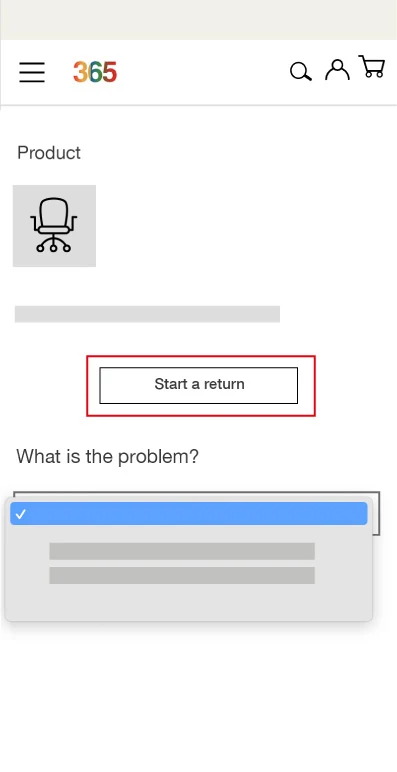
- Select the relevant order and click “Create incident/return”.
- Complete the form indicating the product or products you wish to return. You can attach images, choose the collection time slot (if applicable) and add comments.
Once the request has been submitted, our after-sales team will contact you to provide further information.
Collection and refund conditions
- Collection will be made using the same courier service selected at the time of purchase.
- Once the product has been received and checked, OfficeChair365 will refund the corresponding amount.
- For collection to take place, the product must be dismantled, with all its accessories, and packed in its original box or in suitable packaging.
* If you made the purchase as a guest, you will need to create an account linked to the same email address used for the purchase in order to manage the return.
How do I report an incident with my order?
If you have not received your order, a product from your purchase is missing, or you have received an item that is damaged or incomplete, please let us know as soon as possible by following the steps below.
How to report an incident
- Log in to your customer account*.
- Go to the “My orders” section.
- Select the relevant order and click “Create incident/return”.
- Complete the request indicating the affected product or products. You can attach images, indicate the collection time slot that suits you best (if applicable) and add any additional comments.
Once the request has been submitted, our after-sales team will contact you to let you know the next steps.
* If you made the purchase as a guest, you will need to create an account with the same email address you used for the order in order to manage the incident.
Are returns free?
We will refund the amount of the products you return, but return shipping costs are not refunded and are borne by the customer.
If you need more information, you can read our terms of sale.
When will I receive the refund for my returned order?
Once we have received the product at our warehouse, we will check that everything is in order and that the product has not been damaged. Once checked, we will issue the refund within 3 working days, using the same payment method used for the purchase.
This timeframe may vary depending on public holidays or your bank’s processing times.
Please note that if the returned product is not in optimal condition, a minimum restocking fee of 20% will apply and will be deducted from your refund.
Can I request a refund to a different card or payment method?
No, the refund will be made using the same payment method you used for the purchase. If everything is in order, we will issue the refund within 3 working days. Occasionally this timeframe may vary depending on your bank’s processing times.
Can I make changes to my order or cancel it before receiving it?
Once an order has been confirmed, it cannot be modified, which means items cannot be added or replaced.
However, you have the option to cancel products or quantities depending on the status of your order:
- If your order has not yet been shipped: you can cancel it directly from your customer account and then place a new order with the items you want.
- If your order has already been shipped: you will need to wait until you receive it and then start the return process for the unwanted products from your customer account.
How do I cancel my order?
You can cancel your entire order as long as it has not been shipped.
Steps to cancel an order
- Log in to your customer account or create one if you do not have one yet.
- Go to the “My orders” section.
- Select the order you wish to cancel using the “View order” option.
- Click “Cancel order”.
Important: if your order has already been shipped, you will not be able to cancel it. In that case, you will need to wait until you receive it and then process the return from your customer account.
Can I change my order after receiving it?
Once delivered, the order cannot be modified.
However, you can manage the return from your customer account and place a new order with the items you want.
The courier has not yet contacted me to arrange collection
Collections are usually made within a maximum of 5 working days from the confirmation of the collection day. If this period has passed and you still have not been contacted, please get in touch with our customer service team.
I have received a damaged or defective product. What should I do?
If you have received a defective or damaged item, you can submit your claim by going directly to your personal account.
- Log in and go to “My orders”.
- Select the order you want to return by clicking “View order”.
- In the “Return” tab, tick the products you want to return and indicate the quantities.
- State the reason for the return and the solution you want in order to resolve the incident. You can attach images and add comments. The more details you provide, the faster we can process your request.
We will send you an email responding to your request within a maximum of 2 working days. If you placed the order as a guest and your order is therefore not linked to any account, you can create an account with the same email address or request the return through our contact form.
IMPORTANT: please remember to prepare the product for collection: return it dismantled and with its internal protections, preferably in the original packaging. If you no longer have it, you can use any other packaging that adequately protects the product during transport.
I have received the wrong product. What should I do?
If you have received an item that does not match your order, please let us know as soon as you spot it. In this case, we will send you the correct item as soon as possible. OfficeChair365 will cover the cost of collecting the wrong product and delivering the correct one. To submit your claim, go directly to your account, in the “My orders” section, and select the reason for the incident “Wrong product”.
IMPORTANT: so that we can collect the wrong order, the product must be dismantled and properly packed to avoid damage during transport. If you no longer have the original packaging, you can use another one that adequately protects the product.
How and when is the refund made?
The refund will be made using the same payment method used for the purchase and within a maximum of 14 calendar days from when you request the return. If you send the product yourself, we may wait until we receive it or until you provide proof of postage before issuing the refund. The time it takes for the amount to appear in your account will depend on your bank or the payment method used.
Order tracking and management
Can I request a partial delivery?
If your order includes products with different delivery dates, it will by default be sent in a single shipment, based on the latest delivery date.
If you prefer, you can request a partial delivery, splitting the order into two or more shipments:
- The first shipment will include the items that are in stock and have the nearest delivery date.
- The second shipment will contain the remaining products, based on the latest delivery date.
To activate this option, once your order has been confirmed, please contact our customer service department or your sales representative.
What should I do when I receive my order?
Please check:
- That the products are correct and in good condition.
- That the packaging has no visible damage.
- That the number of packages matches the delivery note.
Can I change the delivery date?
Please contact our customer service team. We will do everything we can to help you.
Where can I see the estimated delivery date?
The estimated date appears on each product page and is confirmed in the last step of checkout. Once payment has been verified, you will receive an email with the approximate delivery date.
If the order is in stock, delivery takes place within 24/48 working hours. Deliveries are made Monday to Friday.
Can there be extra charges for delivery?
Any additional costs arising from lifts, address changes, failed deliveries, storage or incorrect information provided by the customer will be charged to you.
For orders that include assembly, it is essential that you correctly provide the dimensions of access routes, doors and lifts. Incorrect information may generate additional costs or delays.
OfficeChair365 is not responsible for deliveries that cannot be completed due to lack of space. Products are not unpacked to make delivery easier, so we recommend checking the dimensions before purchasing.
By accepting delivery, you agree to:
- Be present on the agreed date and at the agreed location.
- Check the condition of the order when you receive it.
I have not received the confirmation email
We recommend that you:
- Check your spam folder.
- Wait a few minutes.
- Verify that the email address you provided is correct.
If after these checks you still have not received it, please contact customer service.
Why have I not received all the packages?
In some cases, the courier may make partial deliveries.
If 3 working days have passed since the first delivery and you have not received the rest, open an incident from your account so we can help you.
How do I check the status of my order?
You can check the status of your order via live chat, providing the email address you used to place the order and the order number.
You can also do so from your account:
- Log in.
- Go to “My account”.
- Enter “My orders”.
- Select the order you want to check.
Possible order statuses:
- Pending: we have received your order, but payment has not yet been confirmed (common with bank transfers).
- Confirmed: the order is being prepared.
- Cancelled: the order has been cancelled.
- Delivered: the order has already been delivered.
You will also receive an email with the tracking number when the order leaves our warehouse.
Can I cancel an order with customised products?
You can cancel your order as long as it has not been shipped or, in the case of customised products, as long as manufacturing has not started.
Steps to cancel an order
- Log in to your customer account or create one if you do not have one yet.
- Go to “My orders”.
- Select the order you want to cancel.
- Click “Cancel order”.
If the order has already been shipped or the customised product has entered production, it will not be possible to cancel it. In that case, you will need to wait until you receive it and process the return from your account.
Customised products cannot be cancelled or returned once manufacturing has started.
Promotions and discounts
Do you offer discounts for professionals?
We do not have a programme exclusively for professionals, but we do offer special discounts depending on the needs of your project, as well as professional advice and tailored quotes.
You can get in touch with our sales team through our contact form.
Do you have sales or other promotions?
From time to time we launch promotions and special campaigns with exclusive discounts.
The best way to stay up to date is through our website, our newsletter and our social media channels.
That way, you can be the first to know about our discounted products on special dates, available for a limited time, as well as many other promotions.
How can I get a discount voucher?
Discover all the vouchers and promotions that we at OfficeChair365 prepare for you through our website, our newsletter and our social media channels. Be the first to find out about exclusive discounts for special occasions, available for a limited time, as well as many other offers.
Please remember that discount codes and vouchers cannot be combined.
Do you have a discount scheme?
Request your quote today and enjoy special discounts tailored to your project through our contact form.
Get additional discounts, tailored to the needs of your project. The more units you buy, the bigger your discount.
We also offer a range of payment and financing options so you can choose the one that best suits your needs.
OfficeChair365 is the leading European brand in office chairs. In our warehouses we have more than 40,000 office chairs in stock.
Products and certifications
Certifications and safety standards
All our products are designed for professional and intensive use, complying with current legislation and passing demanding laboratory tests.
If you wish, you can ask our sales department for copies of the corresponding certificates.
Office desks
- EN 527-1:2011
Office furniture. Work desks. Part 1: Dimensions. - EN 527-2:2017
Office furniture. Work desks. Part 2: Safety, strength and durability requirements. - EN 15372:2017
Furniture. Strength, durability and safety. Requirements for tables for non-domestic use.
Office chairs
- EN 1335-1:2021+A1:2023
Office furniture. Office chair. Part 1: Determination of dimensions. - EN 1335-3:2009
Office furniture. Office chair. Part 3: Safety test methods. - EN 16139:2013/AC:2015
Furniture. Strength, durability and safety. Requirements for seating for non-domestic use, for adults with a maximum weight of 110 kg.
Desk pedestals
- EN 14073-2:2005: safety requirements.
- EN 14073-3:2005: stability and structural strength.
- EN 14074:2005: test methods for strength and durability.
What warranty do your products come with?
If you purchased the products on or after 1 January 2022, the warranty period is 3 years from delivery.
For orders placed before 2022, the warranty is 2 years from delivery.
Our warranty covers the repair and/or replacement of the affected parts in the event of manufacturing defects.
To make use of the warranty, you must provide the purchase details requested in the returns and incidents form.
If this information is not provided, or if the incident is not related to a manufacturing defect, Ofiprix reserves the right not to apply the warranty or to charge the corresponding transport and repair costs.
Warranty exclusions
The warranty does not cover the following cases:
- Damage resulting from incorrect assembly or assembly other than that indicated in the instructions, as well as from improper use or maintenance of the product.
- Transport of the product without its original packaging.
- Damage caused by burns, cuts, scratches, creases, marks, scuffs, animals or use not in line with the manufacturer’s recommendations.
- Contact with chemical products (acids, solvents, dyes, paints, ammonia, lacquers or other hairdressing products) or use of cleaning products not recommended for the upholstery.
- Natural variations in colour or texture resulting from normal use, as well as maintenance not in line with the manufacturer’s specifications.
- Normal wear or non-premature ageing of the product.
- Indirect losses or damages of any kind.
How can I find a specific product?
You can quickly find a product using the search bar at the top of our website. Simply enter the product name, reference or a keyword and the related results will be displayed.
You can also browse our categories and filters (product type, colour, material, price, etc.) to refine your search and find exactly what you need.
If you have any questions at any time, you can open the live chat and speak to one of our agents. Our advisors are experts in ergonomics and will be happy to help with information, advice and recommendations to furnish your workspace.
Can there be colour differences between the image and the actual product?
You can rely on the product images shown on our website. However, please bear in mind that some materials may show slight variations in tone or finish due to their manufacturing process.
With fabrics, there may be small colour differences between production batches, typical of dyeing and textile production processes.
You should also consider the effect of light. Depending on the type and tone of lighting, the same product may look more yellowish, whiter or darker, which can alter how the colour is perceived depending on the space where the furniture is placed.
The colour temperature refers to the tone of the light and is measured in kelvins (K):
- The higher the number of kelvins, the whiter or cooler the light will be.
- The lower the number of kelvins, the more yellowish or warmer the light will be.
Didn’t find the answer to your question?
Get in touch with us, we’ll be happy to help!